Creating Kafka Topics
In Kafka, messages are sent to and consumed from Topics. While not strictly accurate (there are some important differences), for now you can think of a Topic as what might be referred to as a Queue in traditional message queue environments.
Each profile must include three separate Kafka topics:
- A change data capture (CDC) topic which will contain messages relating to individual changes to records (create, update and delete operations).
- A snapshot request topic where a request to create a new snapshot of the data set can be sent. Producers to this topic are Agents such as the ISAM Agent and SQL Agent, and also some management utilities. There is only one consumer of this topic, the `napshot Agent.
- A snapshot response topic where the one producer to the topic, the Snapshot Agent can send a response message when a snapshot has been created. Consumers of the topic are the same Agents that are producers to the Snapshot Request topic.
Your Kafka (Redpanda) instance is currently exactly as installed and contains no topics; none have yet been created. You will do that now.
Open the Redpanda Console
- Open the Redpanda Console.
- On the left click on Topics.
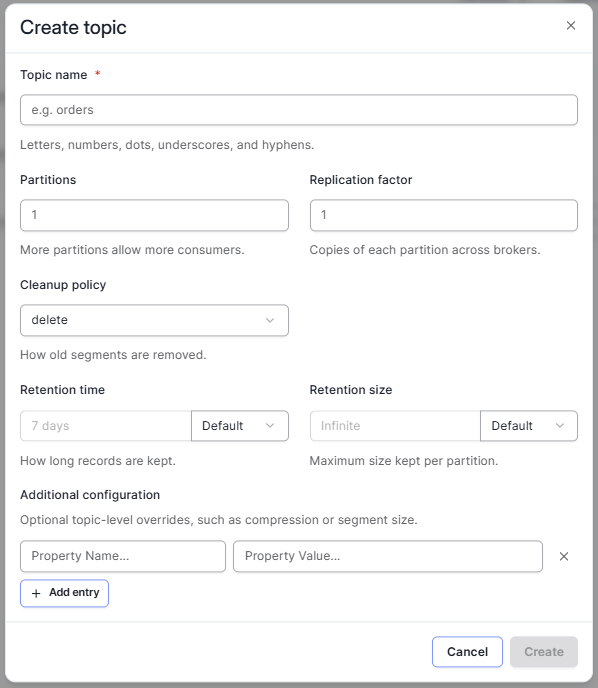
- Click the Create topic button to open the Create topic dialog:
You will see a dialog that looks like this
Create Topics
- In Topic name enter DEFAULT_CDC.
- Click the Create button.
- In the confirmation dialog, click the Close button.
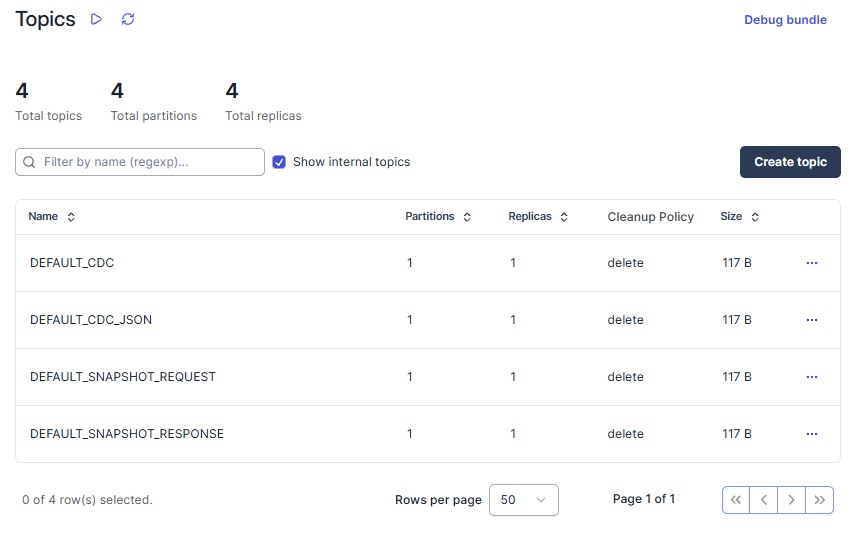
- Repeat the process to create three more topics named:
- DEFAULT_CDC_JSON
- DEFAULT_SNAPSHOT_REQUEST
- DEFAULT_SNAPSHOT_RESPONSE.
You should now see four topics listed:
For now you are done with the Redpanda console, so you may close that browser tab, or just leave it around for later.