Install the SQL Agent
Normally you would download the SQL Agent installer from the Synergex Resource Center but to simplify the workshop a copy of the installer is already present on your Linux server:
~/installers/sip-sql-agent-1.0.0-1.el9.x86_64.rpm
Now it is time to install the Streaming Integration Platform SQL Agent:
Install the SQL Agent
sudo dnf install -y ~/installers/sip-sql-agent-1.0.0-1.el9.x86_64.rpm
sip install sql
As the installation proceeds you will see messages like this:
===============================================================================
 Streaming Integration Platform: SQL AGENT
===============================================================================

By installing this product you accept the terms of the Synergex Product License
agreement (PLA) which can be viewed at:

https://www.synergex.com/wp-content/uploads/2022/08/SDE_PLA_CURRENT-1.pdf

  Using configuration data from /etc/sysconfig/sip.conf
   - Service name  : sip-sql-agent
   - User account  : sip-service
   - User group    : sip-service
   - Dflt profile  : default
   - HTTPS port    : 5127

  Installing       : sip-sql-agent-1.0.0-1.el9.x86_64                                                                                                                                                                                                    1/1
  Running scriptlet: sip-sql-agent-1.0.0-1.el9.x86_64                                                                                                                                                                                                    1/1

  Starting service

 The Streaming Integration Platform SQL AGENT has been installed.

 If you are using Configuration Server and configured the environment before
 starting this installation, and provided information about the environment
 by using /etc/sysconfig/sip.conf then the SQL agent should already be up
 and running.

 If you are not using Configuration Server you will need to manually provide
 configuration files by creating a directory with the lowercase name of the
 profile that you wish to use in /etc/synergex/sip and also copy the necessary
 configuration files to that directory. The necessary configuration files are:

  - MasterConfig.json
  - ServerConfig-SQLAgent.json

 If you change anything in the configuration you must restart the service:

    sudo systemctl restart sip-sql-agent

===============================================================================


  Verifying        : sip-sql-agent-1.0.0-1.el9.x86_64                                                                                                                                                                                                    1/1

Installed:
  sip-sql-agent-1.0.0-1.el9.x86_64

Complete!
Because you are using Configuration Server and pre-configured the environment, the agent should have successfully started.
Confirm the agent is running by viewing its log
sudo journalctl -u sip-sql-agent
sip log sql
Scroll back a little and you should see the information that is logged when the agent starts:
Oct 08 18:22:33 sipws systemd[1]: Started Streaming Integration Platform SQL Agent.
Oct 08 18:22:33 sipws bash[90653]: ===============================================================================
Oct 08 18:22:33 sipws bash[90653]: Streaming Integration Platform: SQL Agent
Oct 08 18:22:33 sipws bash[90653]: ===============================================================================
Oct 08 18:22:33 sipws bash[90653]: Bootstrap mode:         Configuration Server
Oct 08 18:22:33 sipws bash[90653]: Configuration server:   https://sipws:5121
Oct 08 18:22:33 sipws bash[90653]: Configuration cache:    /etc/synergex/sip/default
Oct 08 18:22:33 sipws bash[90653]: Profile name:           default
Oct 08 18:22:33 sipws bash[90653]: --------------------------------------------------------------------------------
Oct 08 18:22:33 sipws bash[90653]: Requesting authentication token from Configuration Server
Oct 08 18:22:34 sipws bash[90653]: Downloading master configuration from Configuration Server
Oct 08 18:22:34 sipws bash[90653]: Downloading server configuration from Configuration Server
Oct 08 18:22:34 sipws bash[90653]: --------------------------------------------------------------------------------
Oct 08 18:22:34 sipws bash[90653]: Local database:                /etc/synergex/sip/sql-agent/sql-agent.db
Oct 08 18:22:34 sipws bash[90653]: TLS cert:                      /etc/synergex/sip/sql-agent/sql-agent-sipws.pfx
Oct 08 18:22:34 sipws bash[90653]: Kafka brokers:                 sipws:9092
Oct 08 18:22:34 sipws bash[90653]: CDC topic:                     DEFAULT_CDC/0
Oct 08 18:22:34 sipws bash[90653]: Snapshot requests:             DEFAULT_SNAPSHOT_REQUEST/0
Oct 08 18:22:34 sipws bash[90653]: Snapshot responses:            DEFAULT_SNAPSHOT_RESPONSE/0
Oct 08 18:22:36 sipws bash[90653]: Admin UI port:                 5127
Oct 08 18:22:36 sipws bash[90653]: File count:                    9
Oct 08 18:22:36 sipws bash[90653]: Table count:                   9
Oct 08 18:22:36 sipws bash[90653]: Consumer wait timeout:         1 seconds
Oct 08 18:22:36 sipws bash[90653]: Inactivity sleep timeout:      1 seconds
Oct 08 18:22:36 sipws bash[90653]: Database name:                 sipws
Oct 08 18:22:36 sipws bash[90653]: Database batch size:           10000
Oct 08 18:22:36 sipws bash[90653]: Database batch timeout:        0 seconds
Oct 08 18:22:36 sipws bash[90653]: Database timeout:              60 seconds
Oct 08 18:22:36 sipws bash[90653]: Database bulk load timeout:    1800 seconds
Oct 08 18:22:36 sipws bash[90653]: Database compression:          NONE
Oct 08 18:22:36 sipws bash[90653]: Logging level:                 Normal
Oct 08 18:22:36 sipws bash[90653]: Email logging recipients:      admins@mydomain.com
Oct 08 18:22:36 sipws bash[90653]: Error behavior:                Continue
Each time the SQL Agent starts it checks to make sure that all of the database tables that are defined in the configuration metadata are present, and if any are found to be missing, a rehydration operation is triggered to ensure that all of the data is present.
Oct 08 18:22:36 sipws bash[90653]: 20261008-182236 Database table check on startup is enabled.
Oct 08 18:22:36 sipws bash[90653]: 20261008-182236 Checking database for missing tables
Oct 08 18:22:36 sipws bash[90653]: 20261008-182236 WARNING: Database is missing 9 tables: Customer, Employee, Inventory, Order, Orderline, Shipto, User, Vendor, Warehouse
Oct 08 18:22:36 sipws bash[90653]: 20261008-182236 9 missing tables: Customer,Employee,Inventory,Order,Orderline,Shipto,User,Vendor,Warehouse
If the agent determines that the tables are not all present it will bring the database up to date by initiating a snapshot restore:
- Search the snapshot response topic for the most recent SQL (Parquet file) snapshot.
- If a snapshot exists, check if the corresponding files are present in S3 storage.
- If the snapshot files were located, they are streamed directly into each corresponding table.
- If a snapshot was NOT located, send a snapshot request message, wait for a snapshot response message, and restore the new snapshot.
Here you can see that the existing snapshot that you made earlier was located and applied to the database:
Oct 08 18:22:36 sipws bash[90653]: 20261008-182236 Restoring missing tables
Oct 08 18:22:36 sipws bash[90653]: 20261008-182236 Searching for parquet snapshots
Oct 08 18:22:37 sipws bash[90653]: 20261008-182237 WARNING: No usable existing snapshots found. Requesting a new snapshot.
Oct 08 18:23:20 sipws bash[90653]: 20261008-182320 Checking snapshot contains missing tables
Oct 08 18:23:20 sipws bash[90653]: 20261008-182320 Restoring table Customer
Oct 08 18:23:20 sipws bash[90653]: 20261008-182320 Restoring table Employee
Oct 08 18:23:20 sipws bash[90653]: 20261008-182320 Restoring table Inventory
Oct 08 18:23:20 sipws bash[90653]: 20261008-182320 Restoring table Order
Oct 08 18:23:21 sipws bash[90653]: 20261008-182321 Restoring table Orderline
Oct 08 18:23:25 sipws bash[90653]: 20261008-182325 Restoring table Shipto
Oct 08 18:23:26 sipws bash[90653]: 20261008-182326 Restoring table User
Oct 08 18:23:26 sipws bash[90653]: 20261008-182326 Restoring table Vendor
Oct 08 18:23:26 sipws bash[90653]: 20261008-182326 Restoring table Warehouse
Oct 08 18:23:26 sipws bash[90653]: 20261008-182326 Missing tables restored
As soon as the snapshot is restored, the agent then checks whether there have been changes to the data since the time the snapshot was created. It does this by comparing the CDC topic offset at the time of the snapshot to the current CDC topic offset.
If the current offset is higher than the snapshot offset then the data changed since the beginning of the snapshot, so the agent will reset its pointer in the CDC topic to the snapshot offset and then play forward, applying all changes that occurred after the start of the snapshot to the local replica database.
In this case there has been no activity since the snapshot was taken, so no catch-up is required, so the data in the local replica database is in-sync with the system-of-record data.
Oct 08 18:23:26 sipws bash[90653]: 20261008-182326 Replica rehydrated from snapshot SNAPSHOT_0; CDC replay resuming from offset 0.
Oct 08 18:23:26 sipws bash[90653]: 20261008-182326 No catch-up required after snapshot restore
Oct 08 18:23:26 sipws bash[90653]: 20261008-182326 Snapshot restore completed. Resuming CDC replay from offset 0 for DEFAULT_CDC/0.
Oct 08 18:23:27 sipws bash[90653]: 20261008-182327 No CDC catch-up required for DEFAULT_CDC/0.
Oct 08 18:23:27 sipws bash[90653]: 20261008-182327 Skipping snapshot restore. Resuming CDC replay from offset 0 for DEFAULT_CDC/0.
Oct 08 18:23:27 sipws bash[90653]: 20261008-182327 No CDC catch-up required for DEFAULT_CDC/0.
Later in the workshop you will see a scenario where a snapshot is restored and there has been subsequent activity, so the local catch-up operation will be required.
Oct 08 18:23:27 sipws bash[90653]: 20261008-182327 READY
When you see the agent reporting READY you know that the startup and data restoration is complete, and the agent is now actively monitoring the CDC topic in real time and will apply any changes that occur in the system of record data to the local replica database.
Visualizing the Data
If you would like to visualize the data that has been replicated to your SQL Server database:
View SQL Data in DbGate
- Open the DbGate Server application.
- Log in using username
adminand passwordp@ssw0rd. - Click on one of the table names in the lower left panel to view the data in that table.
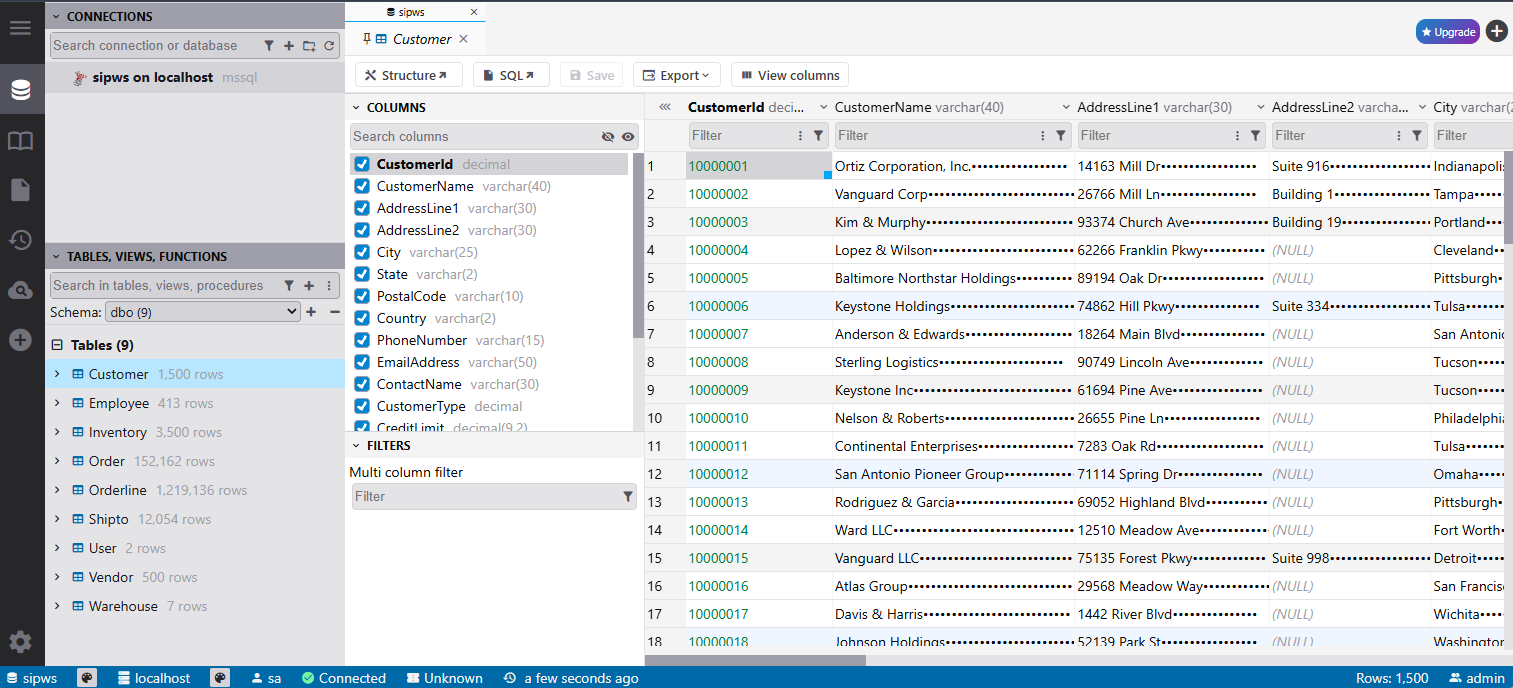
Later in the workshop, as the data changes, you can return to this application to visualize and verify the changes.
Problems?
- If the Agent is not running, seek assistance from a workshop facilitator.