Taking Snapshots
The CDC messages that are stored in the CDC Topic in Kafka have a limited lifetime, based on the message retention period configured for the topic.
To be able to hydrate the data set on a new replica (Agent host) you must have:
- A snapshot of the full data set.
- All CDC messages that occurred since the instant in time where the snapshot started to be taken.
Clearly then, in order to be able to restore your data, it is CRITICAL that AT ALL TIMES you must have a snapshot of the data that is no older than the oldest retained CDC message.
It is also CRITICAL that the Snapshot Agent is running at all times so that it can honor snapshot requests. The taking of snapshots must be done on a regular basis, ideally initiated by an automated process.
It is also STRONGLY RECOMMENDED that you implement an automated process to monitor the availability of the Snapshot Agent, and the process used to initiate snapshots, and ensure that system administrators are notified IMMEDIATELY if a problem is detected.
Taking an ISAM Snapshot
ISAM snapshots are produced by the Snapshot Agent and are initiated when the agent receives a Counted snapshot request message from the snapshot request topic. An ISAM snapshot request looks like this:
{
    "RequestId": "f750732b-45b2-4802-9588-5149546e783d",
    "RequestTime": "2026-10-08T00:16:55.8646533Z",
    "Format": "Counted"
}
The key of the Kafka message is the same GUID that is in the RequestId property.
When an ISAM snapshot request is received, the Snapshot Agent:
- Produces a new counted file snapshot.
- Uploads the snapshot to the bucket on the S3 storage server.
- Sends a snapshot response message to the snapshot response topic.
A Snapshot response message looks like this:
{
    "Version": 1,
    "Created": "2026-10-08T14:46:52.351653430Z",
    "Id": "0a255145-e401-427c-aa2a-feb5d3536e3b",
    "Format": "Parquet",
    "BlobPathCounted": "",
    "BlobPathParquet": "SNAPSHOT_0",
    "MetaBlobPath": null,
    "Offsets": [
        {
            "Topic": "DEFAULT_CDC",
            "Partition": 0,
            "Offset": 0
        }
    ]
}
The value of the Id property is the same GUID that was used in the snapshot request message, and once again, is used as the key to the Kafka message.
To produce an ISAM snapshot, the Snapshot Agent:
- Reads the data from each data file and streams it into a Counted file in an LZ4-compressed archive.
- Writes all of the LZ4 archives to a single TAR file named SNAPSHOT_n.TAR, where n is the current offset in the CDC topic at the time the snapshot was requested.
- Uploads the TAR file to the configured S3 server bucket.
To make it easy to request a new snapshot during the workshop, the sip.sh utility contains code that:
- Reads the Kafka configuration information from MasterConfig.json using the default profile.
- Constructs a new ISAM snapshot request message.
- Sends the message to the snapshot request topic.
Initiate a new ISAM snapshot
sip snapshot isam
You should see messages like this:
Sending to sipws:9092 topic 'DEFAULT_SNAPSHOT_REQUEST' partition 0: {"RequestId":"91c0bcb5-3448-4aef-b75e-655e6d817c42","RequestTime":"2026-10-08T15:25:54.5128400Z","Format":"Counted"}
Produced to partition 0 at offset 3 with timestamp 1791473154545.
Verify the snapshot request
- Use the Redpanda Console to view the Snapshot Request Topic.
You should see a snapshot request message with the GUID value shown in the message from the sip snapshot utility.
By the time you have done this the Snapshot Agent should have completed and uploaded the snapshot.
Verify the snapshot response
- Look in the Snapshot Response Topic where you should see a snapshot response message.
And check the Snapshot Agent log
sudo journalctl -u sip-snapshot-agent
sip log snapshot
Either way, the bottom of the log should look something like this:
Oct 08 08:45:49 sipws bash[62769]: 2026-10-08 08:45:49 -------------------------------------------------------------------------------
Oct 08 08:45:49 sipws bash[62769]: 2026-10-08 08:45:49 received Counted snapshot request ac4ca866-701b-422b-a49f-046806fc4306
Oct 08 08:45:49 sipws bash[62769]: 2026-10-08 08:45:49 Current CDC topic offset: 0
Oct 08 08:45:49 sipws bash[62769]: 2026-10-08 08:45:49 CUSTOMER export starting
Oct 08 08:45:49 sipws bash[62769]: 2026-10-08 08:45:49 CUSTOMER export complete: CUSTOMER.CNT.LZ4 (1500 records, original 319.2 KB, compressed 188.2 KB)
Oct 08 08:45:49 sipws bash[62769]: 2026-10-08 08:45:49 EMPLOYEE export starting
Oct 08 08:45:49 sipws bash[62769]: 2026-10-08 08:45:49 EMPLOYEE export complete: EMPLOYEE.CNT.LZ4 (413 records, original 73.0 KB, compressed 36.3 KB)
Oct 08 08:45:49 sipws bash[62769]: 2026-10-08 08:45:49 INVENTORY export starting
Oct 08 08:45:49 sipws bash[62769]: 2026-10-08 08:45:49 INVENTORY export complete: INVENTORY.CNT.LZ4 (3500 records, original 395.0 KB, compressed 189.4 KB)
Oct 08 08:45:49 sipws bash[62769]: 2026-10-08 08:45:49 ORDER export starting
Oct 08 08:45:49 sipws bash[62769]: 2026-10-08 08:45:49 ORDER export complete: ORDER.CNT.LZ4 (152162 records, original 14.4 MB, compressed 5.5 MB)
Oct 08 08:45:49 sipws bash[62769]: 2026-10-08 08:45:49 ORDERLINE export starting
Oct 08 08:45:49 sipws bash[62769]: 2026-10-08 08:45:49 ORDERLINE export complete: ORDERLINE.CNT.LZ4 (1219136 records, original 71.8 MB, compressed 36.0 MB)
Oct 08 08:45:49 sipws bash[62769]: 2026-10-08 08:45:49 SHIPTO export starting
Oct 08 08:45:49 sipws bash[62769]: 2026-10-08 08:45:49 SHIPTO export complete: SHIPTO.CNT.LZ4 (12054 records, original 1.5 MB, compressed 806.1 KB)
Oct 08 08:45:49 sipws bash[62769]: 2026-10-08 08:45:49 USER export starting
Oct 08 08:45:49 sipws bash[62769]: 2026-10-08 08:45:49 USER export complete: USER.CNT.LZ4 (2 records, original 142 B, compressed 123 B)
Oct 08 08:45:49 sipws bash[62769]: 2026-10-08 08:45:49 VENDOR export starting
Oct 08 08:45:49 sipws bash[62769]: 2026-10-08 08:45:49 VENDOR export complete: VENDOR.CNT.LZ4 (500 records, original 97.3 KB, compressed 55.8 KB)
Oct 08 08:45:49 sipws bash[62769]: 2026-10-08 08:45:49 WAREHOUSE export starting
Oct 08 08:45:49 sipws bash[62769]: 2026-10-08 08:45:49 WAREHOUSE export complete: WAREHOUSE.CNT.LZ4 (7 records, original 774 B, compressed 691 B)
Oct 08 08:45:49 sipws bash[62769]: 2026-10-08 08:45:49 SNAPSHOT_0.TAR total size: uncompressed 88.5 MB, compressed 42.7 MB
Oct 08 08:45:49 sipws bash[62769]: 2026-10-08 08:45:49 SNAPSHOT_0.TAR export phase complete: 359.17248ms
Oct 08 08:45:49 sipws bash[62769]: 2026-10-08 08:45:49 SNAPSHOT_0.TAR upload starting
Oct 08 08:45:50 sipws bash[62769]: 2026-10-08 08:45:50 SNAPSHOT_0.TAR upload complete (1.078490385s)
Oct 08 08:45:50 sipws bash[62769]: 2026-10-08 08:45:50 SNAPSHOT_0.TAR upload phase complete: 1.091541567s
Oct 08 08:45:50 sipws bash[62769]: 2026-10-08 08:45:50 SNAPSHOT_0.TAR snapshot complete: 1.450767006s
Oct 08 08:45:50 sipws bash[62769]: 2026-10-08 08:45:50 Sent snapshot response ac4ca866-701b-422b-a49f-046806fc4306
Oct 08 08:45:50 sipws bash[62769]: 2026-10-08 08:45:50 --------------------------------------------------------------------------------
Check the S3 bucket
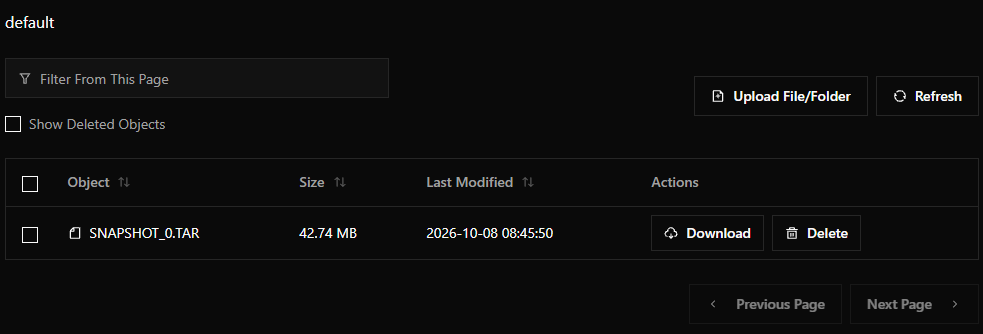
- Check the S3 bucket in the RustFS server.
You should see the snapshot's TAR file:
Taking a SQL Snapshot
Similar to ISAM snapshots, SQL snapshots are produced by the Snapshot Agent and are initiated when the agent receives a Parquet snapshot request message from the snapshot request topic. A SQL snapshot request looks like this:
{
    "RequestId": "f750732b-45b2-4802-9588-5149546e783d",
    "RequestTime": "2026-10-08T00:16:55.8646533Z",
    "Format": "Parquet"
}
To produce a SQL snapshot, the Snapshot Agent:
- Reads the data from each data file and streams it directly into a Parquet file into a path (/SNAPSHOT_n) in the configured S3 server bucket.
- Sends a snapshot response message.
To make it easy to request a new snapshot during the workshop, the sip.sh utility contains code that:
- Reads the Kafka configuration information from MasterConfig.json using the default profile.
- Constructs a new SQL snapshot request message.
- Sends the message to the snapshot request topic.
Initiate a new SQL snapshot
sip snapshot sql
You should see messages like this:
Sending to sipws:9092 topic 'DEFAULT_SNAPSHOT_REQUEST' partition 0: {"RequestId":"0c9848c8-46d3-4f46-a5ef-9aa9b29eca7f","RequestTime":"2026-10-08T15:56:33.4911952Z","Format":"Parquet"}
Produced to partition 0 at offset 1 with timestamp 1791474993520.
Verify the snapshot request
- Use the Redpanda Console to view the Snapshot Request Topic.
You should see a snapshot request message with the GUID value shown in the message from the sip snapshot utility.
By the time you have done this the Snapshot Agent should have completed and uploaded the snapshot.
Verify the snapshot response
- Look in the Snapshot Response Topic where you should see a snapshot response message.
And check the Snapshot Agent log
sudo journalctl -u sip-snapshot-agent
sip log snapshot
Either way, the bottom of the log should look something like this:
Oct 08 08:56:33 sipws bash[62769]: 2026-10-08 08:56:33 -------------------------------------------------------------------------------
Oct 08 08:56:33 sipws bash[62769]: 2026-10-08 08:56:33 received Parquet snapshot request 0c9848c8-46d3-4f46-a5ef-9aa9b29eca7f
Oct 08 08:56:33 sipws bash[62769]: 2026-10-08 08:56:33 CDC topic offset: 0
Oct 08 08:56:33 sipws bash[62769]: 2026-10-08 08:56:33 CUSTOMER export starting
Oct 08 08:56:33 sipws bash[62769]: 2026-10-08 08:56:33 CUSTOMER export complete: 1500 records, 2.822116ms
Oct 08 08:56:33 sipws bash[62769]: 2026-10-08 08:56:33 EMPLOYEE export starting
Oct 08 08:56:33 sipws bash[62769]: 2026-10-08 08:56:33 EMPLOYEE export complete: 413 records, 1.169161ms
Oct 08 08:56:33 sipws bash[62769]: 2026-10-08 08:56:33 INVENTORY export starting
Oct 08 08:56:33 sipws bash[62769]: 2026-10-08 08:56:33 INVENTORY export complete: 3500 records, 3.486824ms
Oct 08 08:56:33 sipws bash[62769]: 2026-10-08 08:56:33 ORDER export starting
Oct 08 08:56:33 sipws bash[62769]: 2026-10-08 08:56:33 ORDER export complete: 152162 records, 96.353144ms
Oct 08 08:56:33 sipws bash[62769]: 2026-10-08 08:56:33 ORDERLINE export starting
Oct 08 08:56:34 sipws bash[62769]: 2026-10-08 08:56:34 ORDERLINE export complete: 1219136 records, 483.811798ms
Oct 08 08:56:34 sipws bash[62769]: 2026-10-08 08:56:34 SHIPTO export starting
Oct 08 08:56:34 sipws bash[62769]: 2026-10-08 08:56:34 SHIPTO export complete: 12054 records, 8.197912ms
Oct 08 08:56:34 sipws bash[62769]: 2026-10-08 08:56:34 SYSPARAMS export starting
Oct 08 08:56:34 sipws bash[62769]: 2026-10-08 08:56:34 SYSPARAMS ERROR: export failed after 21.07µs: 2026-10-08 08:56:34 Reading the isam file /home/admin/data/sysparams.ddf: Invalid magic number
Oct 08 08:56:34 sipws bash[62769]: 2026-10-08 08:56:34 USER export starting
Oct 08 08:56:34 sipws bash[62769]: 2026-10-08 08:56:34 USER export complete: 2 records, 651.081µs
Oct 08 08:56:34 sipws bash[62769]: 2026-10-08 08:56:34 VENDOR export starting
Oct 08 08:56:34 sipws bash[62769]: 2026-10-08 08:56:34 VENDOR export complete: 500 records, 1.220218ms
Oct 08 08:56:34 sipws bash[62769]: 2026-10-08 08:56:34 WAREHOUSE export starting
Oct 08 08:56:34 sipws bash[62769]: 2026-10-08 08:56:34 WAREHOUSE export complete: 7 records, 614.121µs
Oct 08 08:56:34 sipws bash[62769]: 2026-10-08 08:56:34 ERROR: 1 export(s) failed
Oct 08 08:56:34 sipws bash[62769]: 2026-10-08 08:56:34 export phase complete: 598.8425ms
Oct 08 08:56:34 sipws bash[62769]: 2026-10-08 08:56:34 CUSTOMER.parquet upload starting: 365.4 KB
Oct 08 08:56:34 sipws bash[62769]: 2026-10-08 08:56:34 CUSTOMER.parquet upload complete: 44.12335ms
Oct 08 08:56:34 sipws bash[62769]: 2026-10-08 08:56:34 EMPLOYEE.parquet upload starting: 73.3 KB
Oct 08 08:56:34 sipws bash[62769]: 2026-10-08 08:56:34 EMPLOYEE.parquet upload complete: 19.654632ms
Oct 08 08:56:34 sipws bash[62769]: 2026-10-08 08:56:34 INVENTORY.parquet upload starting: 157.0 KB
Oct 08 08:56:34 sipws bash[62769]: 2026-10-08 08:56:34 INVENTORY.parquet upload complete: 20.458818ms
Oct 08 08:56:34 sipws bash[62769]: 2026-10-08 08:56:34 ORDER.parquet upload starting: 6.6 MB
Oct 08 08:56:34 sipws bash[62769]: 2026-10-08 08:56:34 ORDER.parquet upload complete: 192.848937ms
Oct 08 08:56:34 sipws bash[62769]: 2026-10-08 08:56:34 ORDERLINE.parquet upload starting: 16.9 MB
Oct 08 08:56:34 sipws bash[62769]: 2026-10-08 08:56:34 ORDERLINE.parquet upload complete: 449.637858ms
Oct 08 08:56:34 sipws bash[62769]: 2026-10-08 08:56:34 SHIPTO.parquet upload starting: 1.6 MB
Oct 08 08:56:34 sipws bash[62769]: 2026-10-08 08:56:34 SHIPTO.parquet upload complete: 64.589379ms
Oct 08 08:56:34 sipws bash[62769]: 2026-10-08 08:56:34 USER.parquet upload starting: 3.2 KB
Oct 08 08:56:34 sipws bash[62769]: 2026-10-08 08:56:34 USER.parquet upload complete: 20.824696ms
Oct 08 08:56:34 sipws bash[62769]: 2026-10-08 08:56:34 VENDOR.parquet upload starting: 126.1 KB
Oct 08 08:56:34 sipws bash[62769]: 2026-10-08 08:56:34 VENDOR.parquet upload complete: 24.478358ms
Oct 08 08:56:34 sipws bash[62769]: 2026-10-08 08:56:34 WAREHOUSE.parquet upload starting: 4.9 KB
Oct 08 08:56:34 sipws bash[62769]: 2026-10-08 08:56:34 WAREHOUSE.parquet upload complete: 20.774485ms
Oct 08 08:56:34 sipws bash[62769]: 2026-10-08 08:56:34 upload phase complete (869.182341ms)
Oct 08 08:56:34 sipws bash[62769]: 2026-10-08 08:56:34 snapshot complete: SNAPSHOT_0 (request 0c9848c8-46d3-4f46-a5ef-9aa9b29eca7f, total 1.468038717s)
Oct 08 08:56:34 sipws bash[62769]: 2026-10-08 08:56:34 Sent snapshot response 0c9848c8-46d3-4f46-a5ef-9aa9b29eca7f
Oct 08 08:56:34 sipws bash[62769]: 2026-10-08 08:56:34 --------------------------------------------------------------------------------
Check the S3 bucket
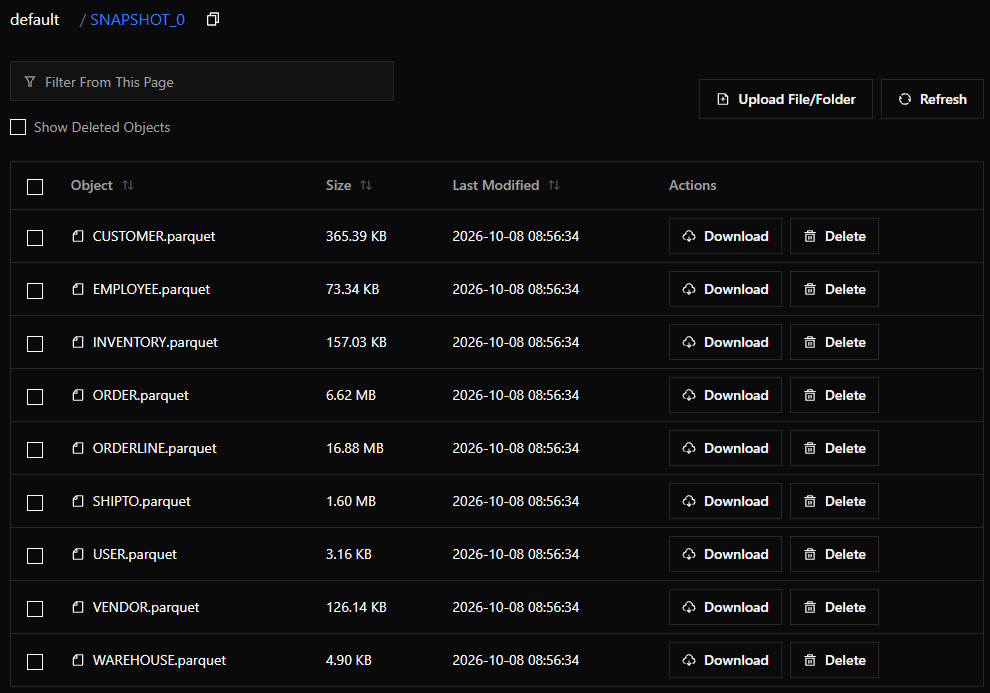
- Check the S3 bucket in the RustFS server.
You should see the snapshot's Parquet files in a path (folder) named SNAPSHOT_0:
Real world snapshots
In the real world, applications have much larger data sets and snapshots will not complete as quickly as they did here. The good news is that unlike taking a traditional backup of the data, snapshots can be initiated at any time; it doesn't matter if there is application activity while the snapshot is being taken, because all of that activity is recorded in the CDC Topic and can be replayed after a snapshot has been restored.