Operational Snapshots
Make new ISAM and SQL Snapshots
Create a new ISAM snapshot"
sip snapshot isam
sip snapshot isam
We already know that with the relatively small amount of data in the workshop environment, snapshots happen really quickly. Wait just a few seconds, then:
View Snapshot Agent Log
sudo journalctl -u sip-snapshot-agent
sip log snapshot
Either way you should see something like this:
Oct 13 16:49:51 sipws bash[6333]: 2026-10-13 16:49:51 -------------------------------------------------------------------------------
Oct 13 16:49:51 sipws bash[6333]: 2026-10-13 16:49:51 received Counted snapshot request 29307455-8663-4689-885c-11a62436453f
Oct 13 16:49:51 sipws bash[6333]: 2026-10-13 16:49:51 Current CDC topic offset: 3407
Oct 13 16:49:51 sipws bash[6333]: 2026-10-13 16:49:51 CUSTOMER export starting
Oct 13 16:49:51 sipws bash[6333]: 2026-10-13 16:49:51 CUSTOMER export complete: CUSTOMER.CNT.LZ4 (1500 records, original 319.4 KB, compressed 188.2 KB)
Oct 13 16:49:51 sipws bash[6333]: 2026-10-13 16:49:51 EMPLOYEE export starting
Oct 13 16:49:51 sipws bash[6333]: 2026-10-13 16:49:51 EMPLOYEE export complete: EMPLOYEE.CNT.LZ4 (413 records, original 73.0 KB, compressed 36.3 KB)
Oct 13 16:49:51 sipws bash[6333]: 2026-10-13 16:49:51 INVENTORY export starting
Oct 13 16:49:51 sipws bash[6333]: 2026-10-13 16:49:51 INVENTORY export complete: INVENTORY.CNT.LZ4 (3500 records, original 446.0 KB, compressed 189.7 KB)
Oct 13 16:49:51 sipws bash[6333]: 2026-10-13 16:49:51 ORDER export starting
Oct 13 16:49:51 sipws bash[6333]: 2026-10-13 16:49:51 ORDER export complete: ORDER.CNT.LZ4 (152162 records, original 14.4 MB, compressed 5.5 MB)
Oct 13 16:49:51 sipws bash[6333]: 2026-10-13 16:49:51 ORDERLINE export starting
Oct 13 16:49:52 sipws bash[6333]: 2026-10-13 16:49:52 ORDERLINE export complete: ORDERLINE.CNT.LZ4 (1219136 records, original 71.8 MB, compressed 36.0 MB)
Oct 13 16:49:52 sipws bash[6333]: 2026-10-13 16:49:52 SHIPTO export starting
Oct 13 16:49:52 sipws bash[6333]: 2026-10-13 16:49:52 SHIPTO export complete: SHIPTO.CNT.LZ4 (12054 records, original 1.5 MB, compressed 806.1 KB)
Oct 13 16:49:52 sipws bash[6333]: 2026-10-13 16:49:52 USER export starting
Oct 13 16:49:52 sipws bash[6333]: 2026-10-13 16:49:52 USER export complete: USER.CNT.LZ4 (2 records, original 142 B, compressed 123 B)
Oct 13 16:49:52 sipws bash[6333]: 2026-10-13 16:49:52 VENDOR export starting
Oct 13 16:49:52 sipws bash[6333]: 2026-10-13 16:49:52 VENDOR export complete: VENDOR.CNT.LZ4 (500 records, original 97.3 KB, compressed 55.8 KB)
Oct 13 16:49:52 sipws bash[6333]: 2026-10-13 16:49:52 WAREHOUSE export starting
Oct 13 16:49:52 sipws bash[6333]: 2026-10-13 16:49:52 WAREHOUSE export complete: WAREHOUSE.CNT.LZ4 (7 records, original 774 B, compressed 691 B)
Oct 13 16:49:52 sipws bash[6333]: 2026-10-13 16:49:52 SNAPSHOT_3407.TAR total size: uncompressed 88.5 MB, compressed 42.7 MB
Oct 13 16:49:52 sipws bash[6333]: 2026-10-13 16:49:52 SNAPSHOT_3407.TAR export phase complete: 486.047386ms
Oct 13 16:49:52 sipws bash[6333]: 2026-10-13 16:49:52 SNAPSHOT_3407.TAR upload starting
Oct 13 16:49:53 sipws bash[6333]: 2026-10-13 16:49:53 SNAPSHOT_3407.TAR upload complete (1.377785648s)
Oct 13 16:49:53 sipws bash[6333]: 2026-10-13 16:49:53 SNAPSHOT_3407.TAR upload phase complete: 1.389948268s
Oct 13 16:49:53 sipws bash[6333]: 2026-10-13 16:49:53 SNAPSHOT_3407.TAR snapshot complete: 1.876067529s
Oct 13 16:49:53 sipws bash[6333]: 2026-10-13 16:49:53 Sent snapshot response 29307455-8663-4689-885c-11a62436453f
Oct 13 16:49:53 sipws bash[6333]: 2026-10-13 16:49:53 --------------------------------------------------------------------------------
Oct 13 16:49:55 sipws bash[6333]: 2026-10-13 16:49:55 -------------------------------------------------------------------------------
Oct 13 16:49:55 sipws bash[6333]: 2026-10-13 16:49:55 received Parquet snapshot request 65354ff5-78c7-42f1-9d59-ae5dcc0400dd
Oct 13 16:49:55 sipws bash[6333]: 2026-10-13 16:49:55 CDC topic offset: 3407
Oct 13 16:49:55 sipws bash[6333]: 2026-10-13 16:49:55 CUSTOMER export starting
Oct 13 16:49:55 sipws bash[6333]: 2026-10-13 16:49:55 CUSTOMER export complete: 1500 records, 3.98949ms
Oct 13 16:49:55 sipws bash[6333]: 2026-10-13 16:49:55 EMPLOYEE export starting
Oct 13 16:49:55 sipws bash[6333]: 2026-10-13 16:49:55 EMPLOYEE export complete: 413 records, 2.644555ms
Oct 13 16:49:55 sipws bash[6333]: 2026-10-13 16:49:55 INVENTORY export starting
Oct 13 16:49:55 sipws bash[6333]: 2026-10-13 16:49:55 INVENTORY export complete: 3500 records, 8.054361ms
Oct 13 16:49:55 sipws bash[6333]: 2026-10-13 16:49:55 ORDER export starting
Oct 13 16:49:56 sipws bash[6333]: 2026-10-13 16:49:56 ORDER export complete: 152162 records, 134.535449ms
Oct 13 16:49:56 sipws bash[6333]: 2026-10-13 16:49:56 ORDERLINE export starting
Oct 13 16:49:56 sipws bash[6333]: 2026-10-13 16:49:56 ORDERLINE export complete: 1219136 records, 556.620903ms
Oct 13 16:49:56 sipws bash[6333]: 2026-10-13 16:49:56 SHIPTO export starting
Oct 13 16:49:56 sipws bash[6333]: 2026-10-13 16:49:56 SHIPTO export complete: 12054 records, 22.604219ms
Oct 13 16:49:56 sipws bash[6333]: 2026-10-13 16:49:56 USER export starting
Oct 13 16:49:56 sipws bash[6333]: 2026-10-13 16:49:56 USER export complete: 2 records, 6.582611ms
Oct 13 16:49:56 sipws bash[6333]: 2026-10-13 16:49:56 VENDOR export starting
Oct 13 16:49:56 sipws bash[6333]: 2026-10-13 16:49:56 VENDOR export complete: 500 records, 3.082812ms
Oct 13 16:49:56 sipws bash[6333]: 2026-10-13 16:49:56 WAREHOUSE export starting
Oct 13 16:49:56 sipws bash[6333]: 2026-10-13 16:49:56 WAREHOUSE export complete: 7 records, 1.008956ms
Oct 13 16:49:56 sipws bash[6333]: 2026-10-13 16:49:56 export phase complete: 739.732014ms
Oct 13 16:49:56 sipws bash[6333]: 2026-10-13 16:49:56 CUSTOMER.parquet upload starting: 365.4 KB
Oct 13 16:49:56 sipws bash[6333]: 2026-10-13 16:49:56 CUSTOMER.parquet upload complete: 72.606414ms
Oct 13 16:49:56 sipws bash[6333]: 2026-10-13 16:49:56 EMPLOYEE.parquet upload starting: 73.3 KB
Oct 13 16:49:56 sipws bash[6333]: 2026-10-13 16:49:56 EMPLOYEE.parquet upload complete: 25.838977ms
Oct 13 16:49:56 sipws bash[6333]: 2026-10-13 16:49:56 INVENTORY.parquet upload starting: 157.0 KB
Oct 13 16:49:56 sipws bash[6333]: 2026-10-13 16:49:56 INVENTORY.parquet upload complete: 27.407563ms
Oct 13 16:49:56 sipws bash[6333]: 2026-10-13 16:49:56 ORDER.parquet upload starting: 6.6 MB
Oct 13 16:49:57 sipws bash[6333]: 2026-10-13 16:49:57 ORDER.parquet upload complete: 264.234098ms
Oct 13 16:49:57 sipws bash[6333]: 2026-10-13 16:49:57 ORDERLINE.parquet upload starting: 16.9 MB
Oct 13 16:49:57 sipws bash[6333]: 2026-10-13 16:49:57 ORDERLINE.parquet upload complete: 629.019095ms
Oct 13 16:49:57 sipws bash[6333]: 2026-10-13 16:49:57 SHIPTO.parquet upload starting: 1.6 MB
Oct 13 16:49:57 sipws bash[6333]: 2026-10-13 16:49:57 SHIPTO.parquet upload complete: 79.901536ms
Oct 13 16:49:57 sipws bash[6333]: 2026-10-13 16:49:57 USER.parquet upload starting: 3.2 KB
Oct 13 16:49:57 sipws bash[6333]: 2026-10-13 16:49:57 USER.parquet upload complete: 23.24876ms
Oct 13 16:49:57 sipws bash[6333]: 2026-10-13 16:49:57 VENDOR.parquet upload starting: 126.1 KB
Oct 13 16:49:57 sipws bash[6333]: 2026-10-13 16:49:57 VENDOR.parquet upload complete: 23.89687ms
Oct 13 16:49:57 sipws bash[6333]: 2026-10-13 16:49:57 WAREHOUSE.parquet upload starting: 4.9 KB
Oct 13 16:49:57 sipws bash[6333]: 2026-10-13 16:49:57 WAREHOUSE.parquet upload complete: 21.968874ms
Oct 13 16:49:57 sipws bash[6333]: 2026-10-13 16:49:57 upload phase complete (1.187018906s)
Oct 13 16:49:57 sipws bash[6333]: 2026-10-13 16:49:57 snapshot complete: SNAPSHOT_3407 (request 65354ff5-78c7-42f1-9d59-ae5dcc0400dd, total 1.92676666s)
Oct 13 16:49:57 sipws bash[6333]: 2026-10-13 16:49:57 Sent snapshot response 65354ff5-78c7-42f1-9d59-ae5dcc0400dd
Oct 13 16:49:57 sipws bash[6333]: 2026-10-13 16:49:57 --------------------------------------------------------------------------------
If you review the log information above you will see that the Snapshot Agent first received and processed the request for the ISAM (counted file) snapshot, and then received and processed the request for the SQL (Parquet file) snapshot.
Note that the names of the snapshots are a little different this time. Yours may be a little different, but in the case of the snapshots that we see being taken in the log shown above, the ISAM (counted file) snapshot is SNAPSHOT_3407.TAR and the SQL (Parquet file) snapshot is in the S3 sub-object SNAPSHOT_3407.
View the snapshots in the S3 server
- Open the Rustfs Console and log in if necessary.
You should now see that there are four snapshots stored:
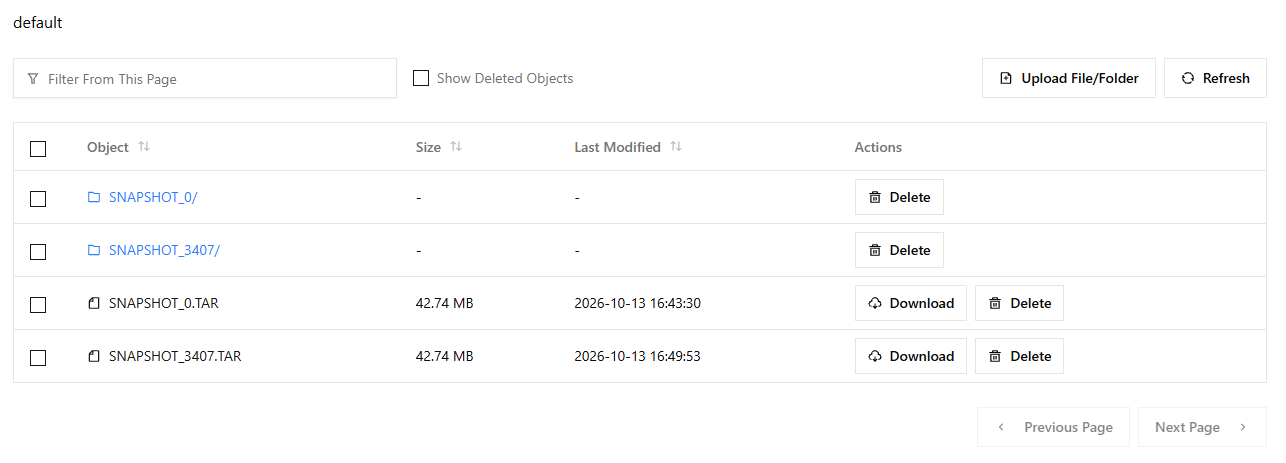
The reason the original snapshot was named SNAPSHOT_0 was not because it was the first snapshot in a zero-based numbering system, but rather because it was associated with OFFSET 0 in the Kafka CDC topic. And the current offset in the CDC topic when the second snapshots were initiated was 3407, thus the snapshots are labelled SNAPSHOT_3407.
It is this naming system that allows agents to know where the CDC topic was at when the a snapshot was initiated, and therefor whether any catch-up is needed after restoring a snapshot, by playing CDC messages forward from the time of the snapshot to the latest CDC message, representing the current state of the data.
The fact that in the example above the ISAM and SQL snapshots were both labelled with the same CDC offset number is because you are in a single-user environment and there was no application activity between the times that the Snapshot Agent started to create the two snapshots. In a real-world scenario there is likely to be concurrent application activity, and therefor it is unlikely that any two snapshots would receve the same offset number, even if the requests were sent at the exact same time.
Cause more application activity
- Use the client application to do another price update.
- Verify that all thee agents process the latest change set.
Now we're going to see what happens if, for whatever reason, things go wrong and an agent's data replica get out of step.
Pause the SQL Agent and delete a table
- Open the SQL Agent Console and log in if necessary.
- On the Status view click the Pause agent button in the upper-right.
Because pausing an agent is something that shouldn't happen under normal circumstances, you will see a Confirm Action dialog that requires that you type two randomly generated words to confirm the action you are taking.
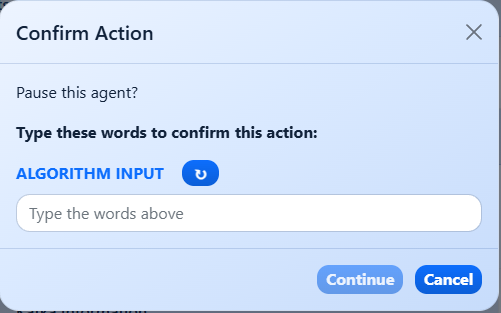
Confirm the action
Type the two words (it's not case sensitive) then click the Continue button.
You will see a red Paused indicator, confirming that the agent it paused, i.e. no longer processing CDC messages.
Prepare to DROP the Customer table
- Go to the Data view.
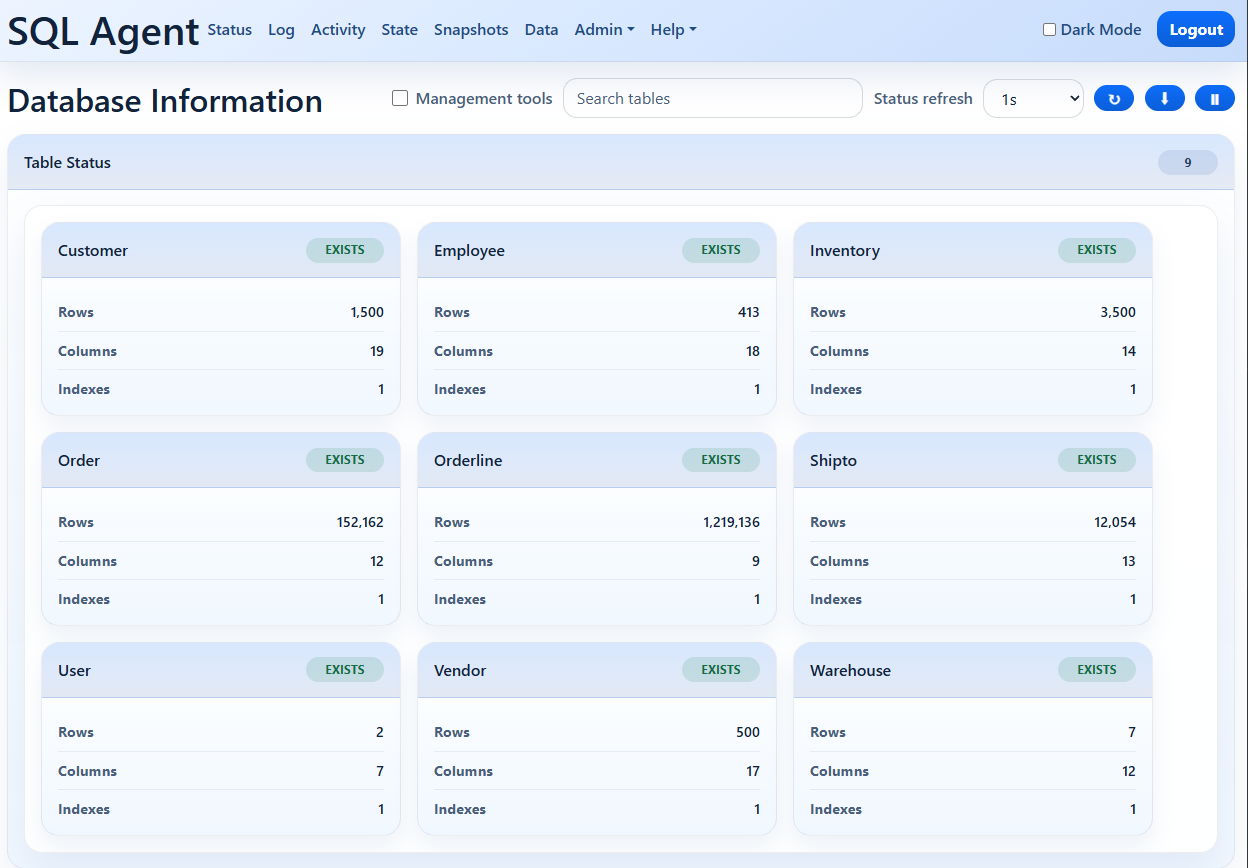
Select the Customer table
- Ckeck the Management tools option.
- Use the picker in the upper-right side to pick the Customer table.

DROP (delete) the table
- Click the Drop table button.
Because dropping a table from the replica database isn't something that should be happening under normal circumstances, you will once again see the two random words confirmation dialog.
Confirm the action
- Type the two words and click the Continue button.
- Confirm the change in the popup dialog.
You will see that the Customer table now shows a red Missing label, and the agent now has a problem, it's missing a table from its replca database. The only way it can recover from that scenario is to:
- Invalidate its replica database.
- Restore the most recent snapshot.
- Replay any CDC messaes that occurred after the snapshot was created.
Return to the Agent Console
- Still in the Data view, change the Status refresh option to 1 second.
- Click the Resume Agent (Play) button and click Yes in the confirmation dialog.
After a brief delay, you should see the label on the Customer table change from MISSING to EXISTS and the card's Rows field once again show the number of rows in the table. The agent has restored the latest snapshot, and replayed later CDC messages, bringing the replica database fully up-to-date.
Review the agent log
- Switch to the Log view.
You should see messages like this:
20261013-173244 Pause request received.
20261013-173244 Pause requested. Will pause after current message.
20261013-173246 Replication paused.
20261013-173920 API request: Drop Customer
20261013-174251 Resume request received.
20261013-174251 Resume requested. Resuming message processing.
20261013-174251 Checking database for missing tables
20261013-174251 WARNING: Database is missing 1 tables: Customer
20261013-174251 1 missing tables: Customer
20261013-174251 Restoring missing tables
20261013-174251 Searching for parquet snapshot at or before CDC offset 6813
20261013-174252 Found snapshot SNAPSHOT_3407 (CDC offset 3407) for selective restore
20261013-174252 Checking snapshot contains missing tables
20261013-174252 Restoring table Customer
20261013-174252 Missing tables restored
20261013-174252 Missing tables restored from snapshot SNAPSHOT_3407; replaying CDC messages for restored tables from offset 3407.
20261013-174252 Catching up restored tables by replaying CDC messages 3407 thru 6812.
20261013-174252 Catch up complete
As you can see, the log shows:
- A pause request being received and implemented.
- A DROP TABLE request being received and implemented.
- A resume request being received and a replica consistency check being initiated.
- A consistency check resulting in an out-of-sync situation; a table was missing.
- A snapshot restore operation being initiated and completed.
- A catch-up operation being initiated and completed.